
Use this page to decide whether to wait, act on the device, or retry after a job ends. Device presence, pairing, job success, a readable file list and successful physical-device restoration need separate checks. The names below match the current UI and state output.
Connection service states
Section titled “Connection service states”USB and Wi-Fi have separate status entries; when both use usbmuxd2, they describe the same physical service. The table below explains each service state and what to do next.
| Message | Meaning | Next action |
|---|---|---|
| No connected devices found | The device-list query succeeded and returned an empty list | Check device connections; an empty list does not trigger a restart |
| Connection service unavailable / device status unknown | Enumeration failed; cached devices do not establish current presence | Wait for detection; do not repeatedly unlock or pair the phone |
| Waiting for the current operation | A service fault is confirmed, but device operations are still active | Observe the existing job; recovery will not stop it deliberately |
| Recovering | Recovery has exclusive access and is restarting and checking the service | Wait for enumeration, registration and pairing validation |
| Recovery failed, retrying later | The restarted service did not pass a protocol query | Allow the backoff period and retain nearby logs |
| Automatic recovery failed / manual action required | The retry allowance is exhausted or device tools cannot execute | Inspect logs and installation; manual restart is available when idle |
Failed queries retain device names and backup information, mark presence unknown, and block affected new device operations. A service error does not establish that the phone was unplugged. Service queries, device trust and backup results are verified separately; successful recovery never reruns a failed backup. API/SSE connection_services describes service state, and presence_known=false means device presence is unconfirmed; do not rely on the cached online boolean alone.
Device and job states
Section titled “Device and job states”| What you see | What it establishes | Next action |
|---|---|---|
| USB / Wi-Fi online | The device was recently detected, or is temporarily missing while the app waits to confirm whether it is offline | Check identity and connection; this does not prove active transfer |
| Paired | This instance has a usable trust relationship | Starting a job may still prompt for the device passcode or trust confirmation |
| Offline | The app can no longer detect the device | Check cable, device and network; for a running job inspect progress first |
Starting starting |
A request was accepted and checks/preparation are underway | Wait for a running state or error; HTTP success is not backup completion |
Running running |
A backup job is still executing | Inspect phase and last activity |
Succeeded succeeded / progress completed |
The tool exited successfully, emitted a success marker and was not cancelled | Check the last-success time and optionally read the file list |
Failed failed |
The job ended unsuccessfully | Record the error; start a new job after resolving its cause |
Interrupted interrupted |
Disconnection or cancellation of the execution context ended the job | Reconnect and start again; the old session will not resume |
The UI after a restart is not a full job-history archive. Keep necessary completion records and sanitized logs; a failed attempt does not advance the last-success time. Server-sent events update status; reloading obtains the current snapshot. Closing the browser does not cancel a server-side backup.
Backup progress semantics
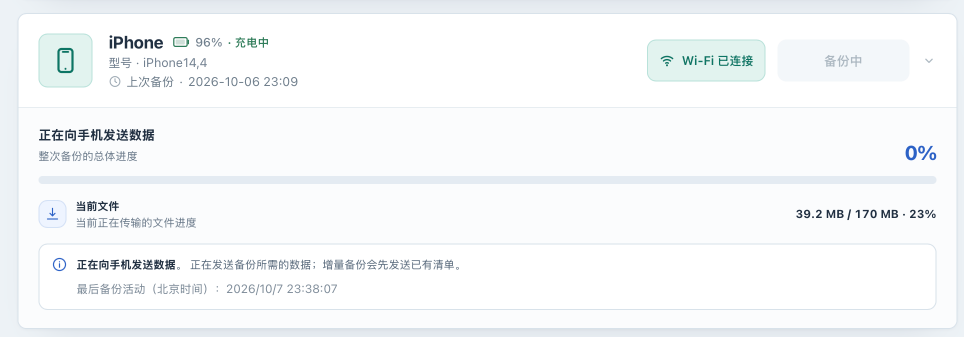
Section titled “Backup progress semantics”The main bar is overall progress for the entire backup. When reliable byte counts are available, current file progress describes the current transfer and may return to a lower value at the next file. The UI does not display the filename and does not estimate remaining time . Without reliable per-file byte counts, it shows overall progress only.
| Phase/display | Meaning | Action |
|---|---|---|
Preparing the backup session preparing |
Measurable overall progress is not available yet | Keep connected and check device prompts |
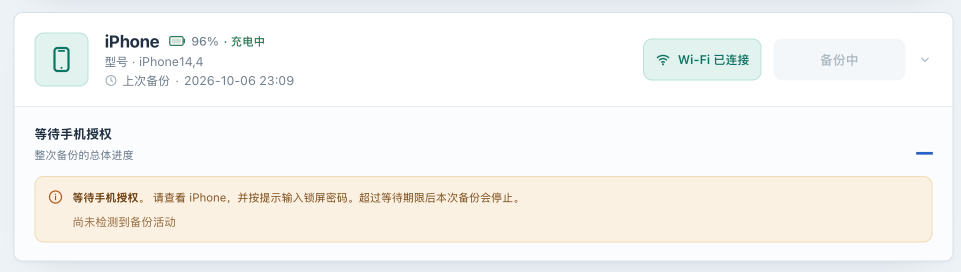
Waiting for device authorization waiting_authorization |
Waiting for a passcode or other authorization | Respond on the device; do not enter its passcode as a backup-encryption password |
Sending data to the device sending |
Protocol data is being sent; incremental backups send the existing manifest first | Watch last activity; overall 0% alone is not failure |
Backup in progress / receiving receiving |
Receiving backup data from the device | Keep the host, disk, device and connection stable |
Waiting for the device waiting_device |
The device is processing the manifest or preparing a response | Large encrypted manifests may take minutes; watch the inactivity deadline |
Waiting for the device to reconnect reconnecting |
Wi-Fi visibility changed temporarily; last reliable progress is retained | Check the device/network and wait for reconnection, or for the job to complete, fail, or be interrupted |
| Overall 100% | Reported progress reached 100%; finalization may remain | Wait for “Backup completed” before unplugging or shutting down |
A terminated job is not resumed automatically . Retrying after reconnection starts a new job, which may reuse the existing on-disk backup set but does not resume the old connection. There is no user-facing cancel-backup button. Refreshing, logging out or closing a tab does not stop the job. The display for waiting for device reconnection is not evidence that an already failed session can resume.
How inactivity deadlines work
Section titled “How inactivity deadlines work”The device tool in the bundled image counts protocol messages and bytes to report send/receive activity without recording their contents. Protocol messages or transferred bytes update last activity; device visibility, heartbeat, wake assertions and repeated percentages do not prove backup activity. If a custom image uses tools without the relevant patch, the app can only check for changes in their output, which is less reliable.
| Inactive phase | Environment variable | Default |
|---|---|---|
| Device authorization | IOSBK_BACKUP_AUTHORIZATION_TIMEOUT |
5m |
| Sending/receiving | IOSBK_BACKUP_INACTIVITY_TIMEOUT |
10m |
| Preparation/device processing | IOSBK_BACKUP_PREPARATION_TIMEOUT |
30m |
These limit consecutive inactivity, not the total duration of an active transfer, and accept 1s–24h. Expiration stops this job, preserves existing backup data and the last-success record, and releases the job slot. Later scheduled attempts still follow eligibility checks; there is no immediate infinite retry loop. Increase deadlines only after confirming that the device needs more processing time; use the configuration reference to apply changes.
Common errors and next actions
Section titled “Common errors and next actions”| Error/log | Meaning or possible scope | Action |
|---|---|---|
backup_busy |
Global backup concurrency is occupied | Wait for existing jobs, then retry once |
backup_stalled |
The current phase exceeded its inactivity deadline | Inspect authorization, last activity and network; use USB after it ends |
device_disconnected |
Sustained device disappearance interrupted the job | Reconnect and start a new backup |
backup_cancelled |
Execution context was cancelled or reached a deadline; this does not imply a cancel button | Check for restart/shutdown and retry after service recovery |
storage_unavailable |
Tool reported no space, read-only storage or denied permission | Check backup-mount capacity, inodes and write access |
device_locked |
Tool reported a device lock/passcode condition | Enter the device passcode when prompted, or unlock the device and confirm Trust |
backup_failed |
Other backup failure | Inspect logs around the same job, keeping the first error |
mobilebackup2 (-4) |
Receiving from the backup channel failed; this alone does not identify the cause | Check connection/device state and compare USB |
MBErrorDomain/207 |
File-list access can fail because of encryption credentials or access conditions | Review encryption; do not delete the manifest as a “repair” |
HTTP 401 / 403 |
Login, CSRF or a capability gate may reject the request | Log in/reload and check prerequisites; do not disable authentication to bypass it |
This table does not list every API error, and error codes may change between versions. Record the actual message and reproduction conditions; use symptom-based troubleshooting for procedures.
Terms used in this manual
Section titled “Terms used in this manual”| Term | Meaning |
|---|---|
| Instance | The running service plus configuration, master key, pairing records and backup data |
| Pairing | Trust between a device and this instance, not an Apple ID login |
| Backup set | Data in a device UDID directory updated incrementally by the tool; not multiple independent time points |
| Manifest | An index of backup files; readability is not verification of every file |
| Unpack | Copying supported unencrypted backup files into a browsable tree; not device restoration |
| Instance recovery | Restoring service data/configuration to a host; see migration |
| Device restore | Experimental writing of data back to an iPhone/iPad; there is no recorded successful test on a real device yet |
| Core / Experimental | Feature maturity; see feature status. None is a data-recovery guarantee |